
Key Takeaways
- Select on four attributes — screen orientation, touch, I/O and kit contents — in that order.
- The screen orientation is set by the cabinet, not the board; match the board to the cabinet, never the reverse.
- I/O is the line that decides whether the board talks to the rest of the machine at all.
Skill Game Board Selection: The Four Attributes
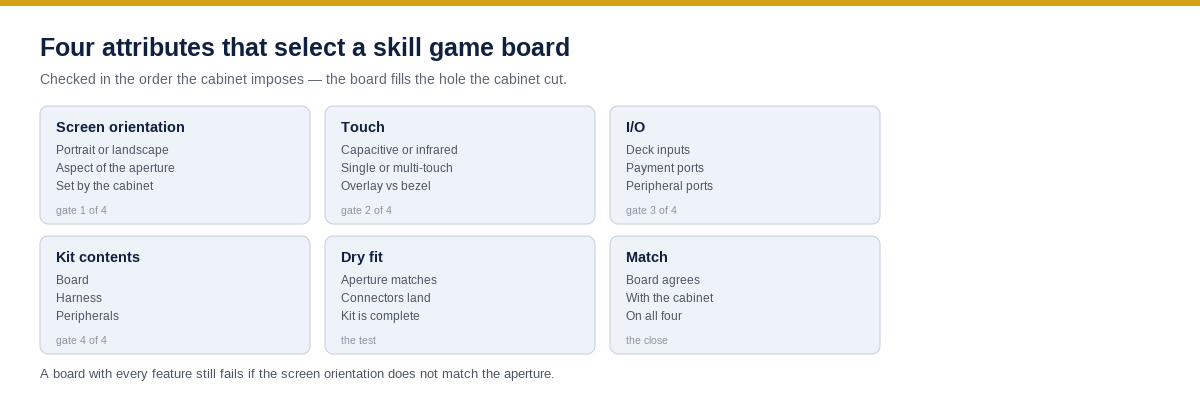
Four attributes decide the board, and they are checked in the order the cabinet imposes.
- Screen orientation: portrait or landscape, and the aspect the cabinet was cut for.
- Touch: capacitive or infrared, single or multi-touch, and the overlay that fits the bezel.
- I/O: the ports and protocols the board exposes to the deck, payment and peripherals.
- Kit contents: whether the board ships alone or with the harness and peripherals the install needs.
Start from the cabinet, not the board. A board with every feature still fails if the screen orientation does not match the aperture.
Screen Orientation and Touch
The screen is the first gate because it is the one the cabinet fixes. Two questions clear it.
- Orientation: a portrait cabinet cannot take a landscape board without a redesign, so confirm the orientation and aspect first.
- Touch: the touch technology has to match the overlay and the bezel — capacitive and infrared do not interchange freely, and multi-touch changes the driver.
Confirm the orientation against the physical cabinet, not the spec sheet, because the spec sheet describes the board and the cabinet describes the hole it must fill.
I/O and Kit Contents
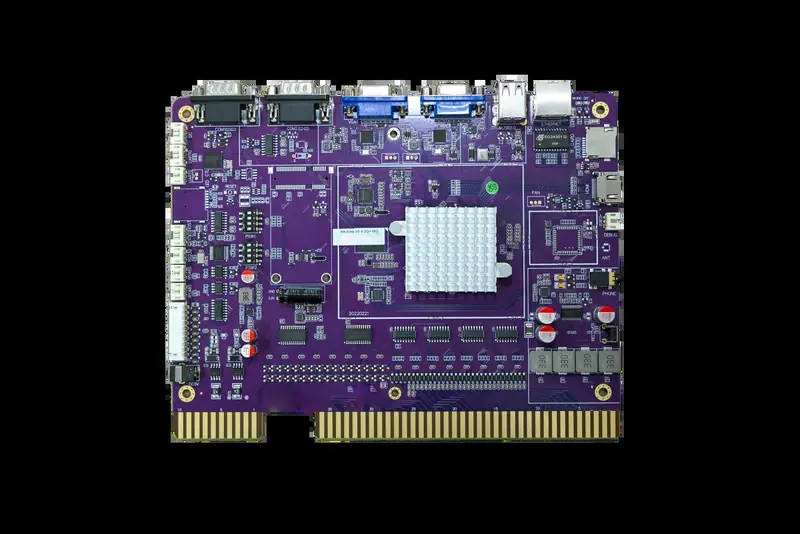
I/O is where a board either talks to the machine or sits silent inside it. Kit contents decide how much else you buy.
| Item | What to confirm | Why it matters |
|---|---|---|
| Deck I/O | Button inputs and the protocol | The deck is the whole control surface |
| Payment I/O | Acceptor and printer ports | A board without a payment path is a demo |
| Peripheral I/O | Readers, lighting, meters | Each unconnected device is a dead feature |
| Kit contents | Board, harness, peripherals | A bare board shifts the integration work to you |
Ask for the kit contents explicitly. A bare board is cheaper on paper and more expensive at install, because every missing harness and peripheral becomes your procurement line.
Matching the Board to the Cabinet
The selection closes when the board and the cabinet agree on all four attributes. The test is a dry fit, not a feature list.
- Screen aperture matches orientation and touch overlay.
- Deck, payment and peripheral connectors land where the harness expects them.
- The kit ships with what the install needs, or the gap is written down before you buy.
A supplier who asks for the cabinet model before quoting a board is doing the matching exercise; one who quotes a board on features alone is selling a spec.
FAQ
How do I choose a skill game board?
Match four attributes to the cabinet, in order: screen orientation, touch, I/O and kit contents. Start from the cabinet you already have, because the board has to fill the hole the cabinet cut.
Does screen orientation really decide the board?
Yes. A portrait cabinet cannot take a landscape board without redesigning the aperture, so orientation and aspect are the first gate and they are fixed by the cabinet, not the board.
What is the difference between capacitive and infrared touch?
They are different touch technologies with different overlays and drivers, and they do not interchange freely. The touch layer has to match the bezel and the board's input, or the touch simply does not work.
Should I buy a bare board or a kit?
A kit ships with the harness and peripherals the install needs; a bare board shifts that procurement to you. A bare board is cheaper on paper and more expensive at install.
Why should the supplier ask for the cabinet model?
Because matching is the job. A supplier who asks for the cabinet model is checking orientation, touch, I/O and fit; one who quotes on features alone is selling a spec, not a working install.
Regulatory detail differs by jurisdiction and changes over time. Where a specification version or an effective date is named on this page, confirm it against the regulator's own publication before a build is released.
Match a Board to Your Cabinet
Send the cabinet model and the screen, deck and payment devices you run. The reply confirms the four attributes and the kit you need.
Request a Quote →