
Key Takeaways
- Three devices can be called a ticket redemption terminal. Decide which role you are buying before you ask for a price.
- The cabinet printer issues; the kiosk validates and pays; the counter exchanges. Each needs a different interface owner.
- A printer without a host that prices the ticket is a printer producing unrecognised paper.
- The kiosk is a system purchase, not a hardware purchase. The host connection is the part that fails first.
- Consumables - ticket stock, print head life, paper width - are a recurring cost line, not an accessory.
- Cash payout at a kiosk is a licensing question in most markets. Confirm it before specifying the device.
The comparison table in section two is what to take to a supplier. The interface questions in section three decide whether the devices you choose can talk to each other at all.
What a Ticket Redemption Terminal Actually Is
The phrase describes a function, not a form factor. In a ticket-out operation three devices share that function, and suppliers use the same words for all of them, which is why quotations for "a redemption terminal" can differ by an order of magnitude and describe entirely different purchases.
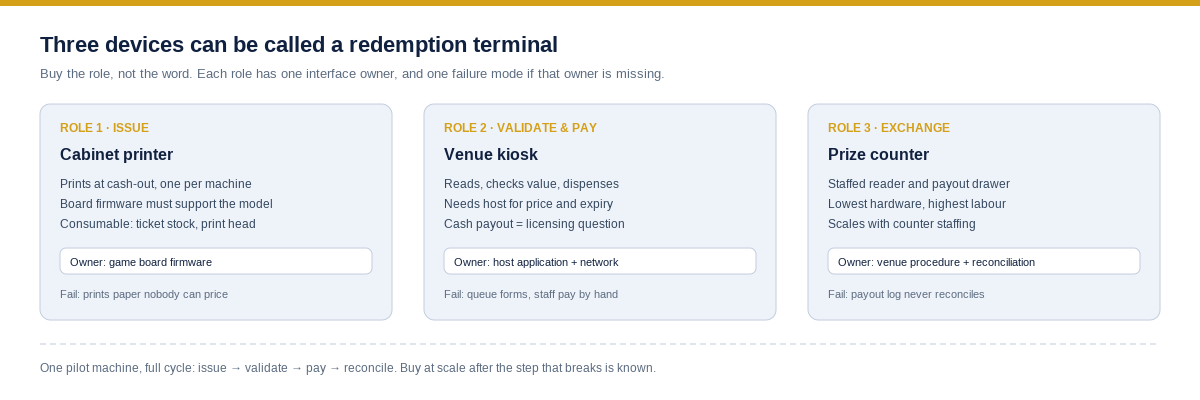
- Cabinet printer - mounted inside the machine, issues a ticket when the player cashes out. Small, cheap per unit, and useless alone.
- Venue kiosk - a freestanding or wall-mounted unit that reads a ticket, validates it against the host, and pays out in cash, credit or a stored value. The most expensive of the three and the one most often bought without its other half.
- Prize counter - staffed, with a reader, a display and either a payout drawer or a prize wall. Lowest hardware cost, highest labour cost.
The common mistake is treating the printer as the system. A printer produces a piece of paper with a barcode; what makes that paper worth money is a host application that knows the ticket's value and a device that can pay it. Buy the printer first and the kiosk later, and the tickets printed in the interval are the ones your staff have to honour by hand.
Cabinet Printer vs Kiosk vs Prize Counter
Four dimensions decide the choice: throughput, labour, cash handling and the licence to pay out.
| Cabinet printer | Venue kiosk | Prize counter | |
|---|---|---|---|
| What it does | Issues the ticket at cash-out | Reads, validates and pays the ticket | Reads and exchanges for cash or prizes |
| Throughput | One per machine, parallel | One queue for the whole floor | Limited by staff |
| Labour | None at issue | Refill and jam clearing only | One attendant per counter |
| Cash handling | None - the ticket is the value | Hopper or dispenser; the main security decision | Manual, cash drawer |
| Licensing exposure | Low | Highest - a paying terminal is a regulated device in some markets | Depends on how prizes are structured |
| Typical mistake | Bought without a host | Bought without confirming the host connection | Bought for a floor size it cannot serve |
A practical rule: a small floor can run printers plus a staffed counter for a long time, because the labour is affordable and the licence question is simpler. A kiosk earns its cost when the queue at the counter becomes the constraint, or when the operator wants to reduce cash handling at the counter. Buying a kiosk to look modern, before either condition is true, is how operators end up with an expensive machine that duplicates a job a person was already doing.
What Interfaces Have to Match
Every device in the chain needs a named interface owner. Four questions, in order.
- How does the printer talk to the machine? Typically a serial or USB connection to the game board, with the board deciding when to issue. The board's firmware must support the printer model, and that is a board question rather than a printer question.
- What prices the ticket? A host application records the value, the barcode format and the expiry rule. Without it, the kiosk has nothing to validate against. Ask which host, who supplies it, and whether the kiosk vendor supports it.
- How does the kiosk reach the host? Network connection, protocol and fallback behaviour when the host is unreachable. The fallback matters more than the connection: a kiosk that stops paying during a network interruption creates a queue and a staff problem within minutes.
- Who handles reconciliation? The kiosk's payout log has to reconcile against the host's issued-ticket log. If nobody owns that reconciliation, the difference appears as unexplained cash and is usually found weeks later.
Cash payout adds a fifth question that is not technical: whether a self-service paying terminal is permitted on the site at all, and under what licence. That is a project question for the local authority, not a supplier answer. Confirm it before specifying the device - a kiosk specified without the licence is a capital item that cannot be switched on.
The interface conventions behind these questions are covered on the cabinet interface page and the linked systems note.
What to Buy: Peripheral, Cabinet or Complete Terminal
Match the purchase to what you already own, in the same way a cabinet buyer matches a board.
| If you already have | Buy | Do not buy |
|---|---|---|
| Machines with no printer | Printer per machine, plus a host or an agreement about who supplies one | A kiosk - nothing will print |
| Printers and tickets in circulation | Kiosk plus the host connection | A second printer model, which fragments consumables |
| A venue management system | The device its integration list supports | A cheaper device outside that list |
| Nothing yet | One printer on one machine, a staffed counter, and a pilot period | A full kiosk fleet before the ticket flow is proven |
The pilot logic is worth stating plainly: run one machine's ticket flow end to end - issue, validate, pay, reconcile - for a few weeks before buying devices at scale. The information you gain is which step breaks, and that answer decides the rest of the purchase.
Supply Scope and Consumables for a Ticket Redemption Terminal
Three lines sit outside the device price and appear in the first quarter of operation.
- Ticket stock. Width, coating and barcode compatibility are model-specific. A printer specified for one ticket width cannot use another, and mixing suppliers mid-run is how jams start. Specify the stock with the printer, then buy it in a repeating line rather than as an emergency purchase.
- Print head life. A consumable with a stated life in tickets. Ask for the figure per model and treat it as a recurring cost, because a floor of machines will consume heads on a schedule.
- Service parts. Bezel, feed rollers, dispenser belts and the kiosk's reader. These are the items that stop a terminal working, and none of them are in a machine's standard spare kit.
Ask for the consumable and service-part list with the quotation, priced as a repeating line. A terminal quoted without its consumables is a device with an unknown running cost, and running cost is what decides whether ticket-out is cheaper than coin for your floor.
What to Send for a Terminal Quote
- The role you are buying - printer, kiosk or counter - and how many of each.
- Existing machines: board model, firmware version, and whether the board already supports a printer.
- Existing systems: host or venue management software, and who supports it.
- Ticket specification: width, barcode format, expiry rule.
- Payout method: cash, credit, stored value or prize, and whether self-service payout is licensed on the site.
- Floor size and expected cash-out rate, so the device count is sized to the queue rather than to the budget.
- Consumables: whether you want ticket stock and service parts on the same quotation.
Send this to every candidate device vendor. Three vendors quoting against one specification is a comparison; three vendors quoting against three assumptions is a shortlist with no basis.
FAQ
What is a ticket redemption terminal?
It is a device that turns a paper or virtual ticket into value. In practice the role can be played by a printer inside the cabinet that issues the ticket, a self-service kiosk that validates and pays it, or a staffed counter that exchanges it. The term describes the function, not one product.
Can I add a kiosk to machines that already print tickets?
Only if a host application prices and tracks those tickets and the kiosk can connect to it. Tickets already in circulation need to be validatable, which means the host must recognise their format and value. Confirm the host connection before buying the kiosk, not after.
Does a ticket printer work without a host system?
It prints, but the paper carries no validated value. Without a host that records the ticket and its amount, a kiosk has nothing to check and staff have to honour tickets manually. A printer is the issue side of a system, not the system.
Is a self-service cash payout kiosk allowed everywhere?
No. A terminal that pays cash is a regulated device in many jurisdictions, and permission depends on the site's licence and on local rules. Confirm with the authority that inspects the venue before specifying the device, because an unlicensed kiosk cannot be operated.
What consumables does a ticket-out floor need?
Ticket stock in the specified width and coating, print heads with a stated life in tickets, and service parts such as bezels, feed rollers, dispenser belts and reader modules. All three are recurring costs and should appear as repeating lines on the quotation rather than as emergency purchases.